 inspect
Building robust helm charts
Building robust helm charts
In my current work, there is often the need to deploy a similar application
stack in various configurations, to several environments. Each configuration may
vary in terms of scale, uptime requirements and feature flagging. Due to a lot
of flux in infrastructure set up, each environment is also not equivalent. On
top of this, there are obviously financial requirements to run all of this as
cheaply as possible. Kubernetes and helm templating are valuable tools in this
situation, they allow us to create a configuration blueprint with the details
abstracted in values.yaml files.
Use helm’s built in linter
Let’s start with the basics, helm provides a helm lint command which performs
checks
- YAML syntax
- Template rendering
- Missing or misnamed required files
- Best practice violations
You can run this with your different values.yaml files to ensure that all your configurations are compliant.
It’s also a good idea to use the helm template command to actually check that
helm is able to render your templates.
Parallels with front end templating
I like to compare helm templating with html templating tools like JSX. This
allows front end developers to create reusable components usable throughout
pages of a web application, A button component for example can have many states,
primary, secondary, loading, disabled, light or dark mode.
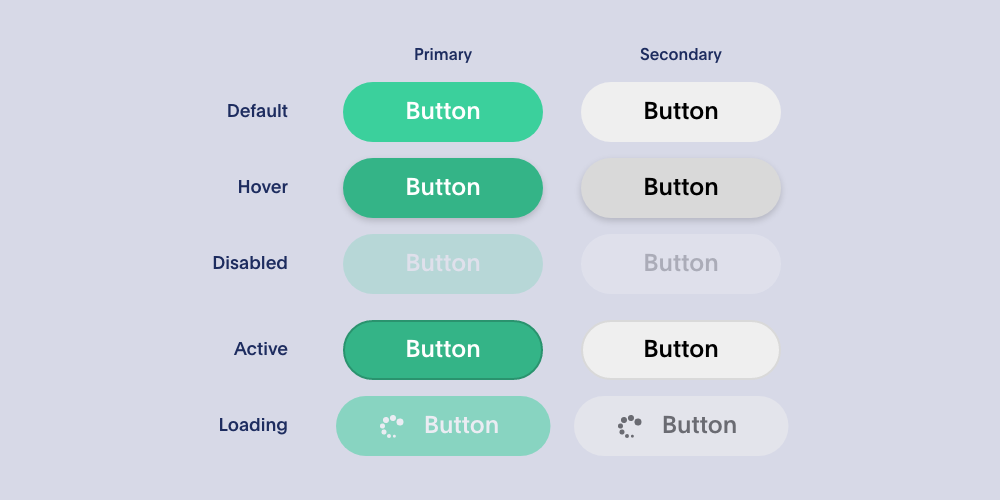
Each state may also look different depending on the size/type of device your are browsing the site with. Each of these states represents differences in many parameters (font size, colour, gradient, opacity, border, padding, margin, width, height, etc). These complexities are abstracted away giving the consuming code the list of states to chose from, so that they can write code like this.
<button type="primary">Click Me!</button>
Under the hood of course many aspects of the CSS or HTML code will be impacted by the change of state so you often end up with different parts of the markup having conditionals on the same check.
const Button = (props) => {
    return (
        <button className="btn btn-primary {classesForState(props.state)}">
            {props.state == "loading" && <span><svg src="loading.svg" /></span>}
            {props.children}
            <span>
        </button>
    );
}
Just in this contrived example you already have 2 different things being controlled by the state property with 2 separate checks, the CSS classes and the presence of the loading icon.
This is quite similar to the situation you end up templating in YAML with helm.
Consider an application that has optional persistent storage. You could quite
easily imagine a boolean property in your values.yaml file called
persistent. Under the hood this has many implications likely affecting
different files.
- Conditional creation of a PersistentVolume resource
- Conditional creation of a PersistentVolumeClaim resource
- Conditional storage requests/limits in your Pod
- Adding a
volumesblock to your Pod - Adding a
volumesMountblock to your Pod
That’s 5 separate if blocks that need to be in your templates.
Forgetting one of these blocks could cause your application to function incorrectly and in this case, even cause unexpected data loss. Rather than find these problems out post deployment we can use the output of helm template with specific values to ensure that the right manifests are generated before going anywhere near a kubernetes cluster.
Helm unit test
After talking about this problem with a colleague, they told me that his team use helm unit test for this. This is a simple helm plugin that allows us to assert on the output of helm templates using yaml tests.
A test for the case described above could look like this. Assuming you have your chart templates arranged as one file per resource:
test-chart
├── Chart.yaml
├── templates
│   ├── _helpers.tpl
│   ├── persistent-volume-claim.yaml
│   └── pod.yaml
└── values.yaml
You could add a test for the persistent volume and a similar one for the persistent volume claim
suite: persistent volume suite
templates:
  - persistent-volume.yaml
tests:
  - it: doesn't include when persistence is disabled
    set:
      persistent: false
    asserts:
      - hasDocuments:
          count: 0
  - it: includes when persistence is enabled
    set:
      persistent: true
    asserts:
      - containsDocument:
          kind: PersistentVolume
          apiVersion: v1
Then you could add another test for the pod
suite: pod suite
templates:
  - pod.yaml
tests:
  - it:
      Sets storages limits and no volumes are added when persistence is disabled
    set:
      persistent: false
    asserts:
      - notExists:
          path: spec.volumes
      - notExists:
          path: spec.containers[0].volumeMounts
      - equal:
          path: spec.containers[0].resources.requests.ephemeral-storage
          value: 500Mi
      - equal:
          path: spec.containers[0].resources.limits.ephemeral-storage
          value: 1Gi
  - it: Volume is added when persistence is enabled
    set:
      persistent: true
    asserts:
      - lengthEqual:
          paths:
            - spec.volumes
            - spec.containers[0].volumeMounts
          count: 1
      - exists:
          path: spec.volumes
      - exists:
          path: spec.containers[0].volumeMounts
      - notExists:
          path: spec.containers[0].resources.requests.ephemeral-storage
      - notExists:
          path: spec.containers[0].resources.limits.ephemeral-storage
Your chart directory should now look like this
test-chart
├── Chart.yaml
├── templates
│   ├── _helpers.tpl
│   ├── persistent-volume-claim.yaml
│   └── pod.yaml
├── tests
│   ├── persistent_volume_claim_test.yaml
│   ├── persistent_volume_test.yaml
│   └── pod_test.yaml
└── values.yaml
You can run these tests with a single docker command which should be simple to integrate into your CI configuration
docker run -t --rm -v $(pwd):/apps helmunittest/helm-unittest:3.19.0-1.0.3 test-chart
Now you have confidence that the templated output for persistent and non persistent configurations is as you expect. If someone removes one of your template conditionals, they will be warned by failing tests.
Native helm test
Unit tests are all well and good, but they don’t really confirm that your chart works correctly or even that your templated output contains valid kubernetes manifests. This is where helm’s native test feature comes in. It allows you to run checks on your chart after it’s been deployed to a cluster. If your chart is for a custom built application, this could be your integration test suite, but if it’s a deployment of some vendor application with custom configuration, this is also a great way to check that your configuration works as expected. I find this especially useful for things like proxy servers.
As a simple example, let’s say you’re deploying a proxy to handle TLS redirection, in nginx, that would be something like
server {
    listen 80 default_server;
    server_name _;
    return 301 https://$host$request_uri;
}
You could use something like hurl to check that http requests are indeed redirecting to their https alternatives. You can put a hurl script in a config map.
# templates/tests/proxy-tests-config-map.yaml
apiVersion: v1
kind: ConfigMap
metadata:
  name: "proxy-test-requests"
  annotations:
    "helm.sh/hook": "pre-install,pre-upgrade"
    "helm.sh/hook-weight": "0"
    "helm.sh/hook-delete-policy": before-hook-creation
data:
  tests.hurl: |
    # Test https redirection
    GET http://my-proxy.my-namespace.svc/path
    HTTP 301
    [Asserts]
    header "Location" == "https://my-proxy.my-namespace.svc/path"
And then add a pod to run it
# templates/tests/proxy-tests-pod.yaml
apiVersion: v1
kind: Pod
metadata:
  name: proxy-tests
  annotations:
    "helm.sh/hook": "test"
    "helm.sh/hook-weight": "1"
    "helm.sh/hook-delete-policy": "before-hook-creation"
spec:
  containers:
    - name: hurl
      image: ghcr.io/orange-opensource/hurl:7.1.0
      command: ["hurl"]
      args: ["--test", "/tests/tests.hurl", "--verbose"]
      volumeMounts:
        - name: "proxy-test-requests"
          readOnly: true
          mountPath: /tests
  volumes:
    - name: "proxy-test-requests"
      configMap:
        name: "proxy-test-requests"
  restartPolicy: Never
You can also use this to perform other checks, the advantage is that you can run these checks in the same kubernetes namespace that you deployed to giving you real world network conditions for example.
You can run these right after your deploying your chart in your CI system.
  helm test hs-solr-migration-proxy \
    --logs
The --logs argument will output the test pod’s logs in the output of
helm test so you can examine failures easily and without necessarily accessing
the cluster yourself.
Generating documentation
It’s also important to have human friendly documentation for your charts so that consumers understand the various options available set in their values.yaml files, what the defaults are and what each option does. The helm-docs tool, parses your chart values and metadata to generate documentation in a README.md file. Without any additional effort it will create a table of all the options and their default values. You can add a description column by adding a comment above the parameter in your values.yaml file.
# -- Saves application data to a persistent volume surviving application restarts
persistent: true
helm-docs also supply a pre-commit configuration which you can use to automatically regenerate the documentation when the chart changes which helps keep it in sync.
Full pipeline
To summarise, if we combine all the things we’ve discussed in this post, your workflow for creating a robust helm chart might look like this.
- Make chart changes annotating your values file with comments to be consumed by helm-docs
- Check your chart validates with
helm lintandhelm tempate - Add unit tests using helm unit test
- Add integration tests using helm’s native tests
- Generate documentation using helm-docs
- Run linting, unit tests in CI before publishing
- Run integration tests immediately after your deployment.